

Dudoxx Sentinel for research and registries
Paper forms in. Checked data out.
Dudoxx Sentinel reads filled paper forms, faxes and phone photos in large batches. A field it is unsure about is never guessed: a person sees it, with the image crop of its place on the page.

Why Sentinel
Stop re-typing. Start reviewing.
Registries and studies still receive paper: fax, patient questionnaires, old archives. Someone reads every page and keys every answer, sometimes twice. It takes months, and afterwards nobody can see why a value reads the way it does.
The way it works today
- Every page is read and keyed in by hand, sometimes twice.
- The backlog grows faster than the team can clear it.
- Typing errors stay hidden until someone analyses the data.
With Sentinel
- Fields are read for you, and each one keeps the image crop of its place on the page.
- Your team checks only the doubtful fields, not whole pages.
- What the checks do not confirm goes to a person, never into your data as a guess.
Capabilities
Everything the review desk needs, nothing it does not.
Built around one rule: every value carries its source. Then the parts a team needs around it.
| Question | Answer | Evidence |
|---|---|---|
| Question 4 | Yes | 2 readers agree |
| Question 7 | 3Worth a second look | Check this |
| Question 9 | Could not readFlagged for a person | To a person |
Built for bulk
A single page or a whole batch
Checkboxes, number boxes and handwriting, read from box-labelled forms and written to your target structure. German standard forms are ready; other European and custom forms are added per project from one blank copy.
Measured throughput
1,373 pages per hour
Measured on our own servers in Germany: a batch of 30,000 pages in about 22 hours of machine time. Review by your team comes on top.
See supported standardsIntake
Send a whole batch at once
Drop one archive or several scanned files. Each page is tied to its document before anyone reads it.
Quality
See the quality before you trust it
Every improvement is measured on the same 80 synthetic test pages: how many accepted answers are right, how often the image crop sits in the right place, and how many fields go to a person.
Reporting
Follow every improvement, step by step
Each improvement is measured the same way, so you see what changed and by how much.
Scans, faxes and photos
Upload single pages or whole batches. Poor scans and faxes are expected, not rejected.
A score for every answer
Each answer shows where it came from and whether the checks agreed, so nobody has to re-read a whole page.
Every value, with its source
When the checks do not agree on a field, Sentinel does not guess. The field goes to a person, with its image crop.
Fast, keyboard-first review
Doubtful fields come first, next to the image crop of their place on the page. Correct them without reaching for the mouse.
Clean export to your schema
CSV or Excel with a codebook and an audit file. Columns match your target format, with fixed number and date formats and documented codes for missing answers.
A complete audit trail
Every correction records who changed what and when, with the original value. A re-run never overwrites the human value.
More than reading
A platform your whole team can work in
Documents, audio, folders, roles and connectors for AI assistants. The full capabilities page marks each one Available or Coming.
Document knowledge base
Every document becomes a linked, plain-text knowledge bundle in an open format. Browse it, see where each piece sits on the page, search and download.
Audio recordings
Upload a recording and get a timestamped transcript that follows playback. Speech recognition runs on your own systems by default.
Photographed pages
Photographed, faxed and skewed pages are straightened and cleaned. Unsure fields go to a person with the image crop.
Review workflows
Every correction states a reason and is audited. A re-run never overwrites a human correction.
Folders and separate customers
Each customer is a separate tenant. Access follows the folder, and a folder you may not read stays hidden.
Connectors for AI assistants
Two connectors let an assistant submit documents and read values with confidence and location.
Knowledge
A knowledge bundle for every document
Browse the linked pages of a bundle, see where each piece sits on the original page and search.
Knowledge
A transcript that follows playback
Play a recording and read the timestamped transcript as it moves with the audio.
Administration
Folders with their own access
Each folder has its own rights for read, write and manage, so people see only what they may.
From paper to data
Damaged paper in. A clean spreadsheet out.
Faxes, crooked scans and bent phone photos arrive every day. Sentinel reads them, scores every field and leaves a field blank when it cannot read it, so a person checks only what is in doubt, with the image crop.
In
The paper you already receive
Fax, 200 × 100 dpi Scan, skewed 4° Photo of a bent page
Sentinel
Reads every field, scores how sure it is and hands doubt to a person instead of guessing.
Out
A spreadsheet your team can use
results.xlsx
Example spreadsheet made from the documents Document Arrived as Itch last week Evidence SYN-0001 Fax A little 2 readers agree SYN-0002 Skewed scan Very much 2 readers agree SYN-0003 Bent photo Not at allWorth a second look Check this SYN-0004 Fax Could not readLeft blank for a person To a person SYN-0005 Scan A little 2 readers agree Export formats
- Excel (.xlsx)
- CSV (.csv)


Beyond forms
Letters, reports and recordings, read with their source.
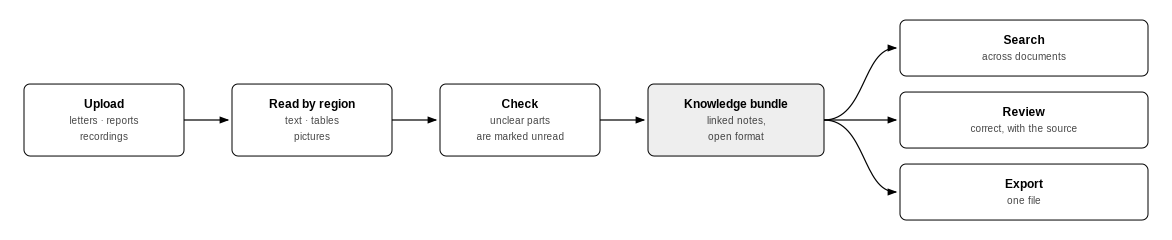
Not every page is a form. Sentinel also reads letters, reports, leaflets, scans with text, pictures and tables, and turns spoken recordings into a transcript. Every piece keeps its place on the page, and what cannot be read is marked, not guessed.
Read by region
Each page is divided into regions, and each region is read for what it is: text, table, picture or heading.
Every piece shows its source
Click a passage and see where on the page it came from, next to the original image.
Unreadable stays marked
A region that cannot be read reliably is marked as unread, with a reason, instead of being filled with a guess.
A knowledge bundle per document
Linked plain-text notes with the page images, figure crops and table data, in an open format you can take anywhere.
Search across documents
One search covers every document a user may see, and opens the passage on the page.
Review and correct
Staff correct any region in the viewer. The correction wins over the machine reading, is recorded, and a re-run never overwrites it.

How it works
Three steps for your team.
No new habits to learn. Upload, check what is doubtful, export.
Step 1
Upload
Drop in scans, faxes or photos of filled forms, one page or a whole batch.
Step 2
Review
Check the fields Sentinel is unsure about, each with its image crop. Confident fields are already done.
Step 3
Export
Download CSV or Excel with a codebook and an audit file, in the format your analysis already expects.
Latest results
Doubtful fields go to a person, with the image crop.
Latest run on synthetic test forms, 17 October 2026: 1,272 fields across 8 page qualities, from clean print to fax and photographed pages.
Fields read correctly
1,228 of 1,272
Measured across eight page qualities: clean print, scans, fax and pages photographed by hand.
Wrong values kept
1 of 1,272
About 1 in 1,000. A field the checks do not confirm goes to a person with its image crop.
Sent to a person
43 fields
Each one arrives with the image crop of its place on the page, so the reviewer sees exactly what to check. No field was missed.
Synthetic test forms, latest run, 80 pages. The image crop sat in the right place on 1,271 of 1,272 fields. Results on your own forms are confirmed in a blind test before you commit.
Trust and privacy
Your documents stay with you.
Sentinel is built for sensitive data. It runs on Dudoxx servers in Germany or on your own server, uses no outside AI provider, and keeps a person in charge of every doubtful field.
Sentinel is the research and registry product of the Dudoxx AI HMS. It runs on the Dudoxx fine-tuned, trained and optimised LLM agentic pipeline, the result of four years of Dudoxx research and development.
Germany or your server
Runs on Dudoxx servers in Germany or on your own server. No outside AI provider sees your documents, and they never train a model.
Designed for European health data
Designed for health data under European data-protection law, with a named processing location and an agreement on data processing before any real document is shared.
People decide
Sentinel proposes, your reviewers decide. Nothing doubtful reaches your data without a human check.
Provable
Every field can be traced back to its page, and every correction to its author, with the original value.
Who it is for
For the teams who carry the paper.
Registries, clinical studies, non-interventional studies and every team that still receives filled paper forms.
Data managers
Clear the intake backlog by checking flagged fields instead of keying every page. Each flagged field comes with its image crop.
Registry and study leads
Turn the paper tail of a registry or study into a dataset in weeks, not months, with a record of every correction.
Statisticians and analysts
Receive columns you can analyse straight away, with blanks and unreadable answers kept apart.
Data-protection officers
Know where the data is processed, and prove who changed what and when.
See it with your own forms
Sign in and send a first batch. Your pages stay on servers in Germany and train no model.
Contact
Talk to the team behind Sentinel.
Questions about a registry, a study or a setup on your own server? Tell us what reaches you on paper today.
Prefer email? Write to us directly.
Email:contact@dudoxx.com
Ready to clear the paper backlog?
Sign in to upload your first forms, or ask for a blind test on 50 to 100 of your own forms.